



In a previous blog, we explained why omnichannel delivery, the ability to deliver data via different channels and methods to users, is key to accelerating growth for data-driven services.
First, let's assume you've already connected your data, maybe live, into your ipushpull platform using one of our "easy on-ramp" integrations.
In this blog, we'll explore end-user delivery, and specifically chat as a channel focussing on chatbots and notifications, describing how to set them up quickly and efficiently in the ipushpull platform and the value they bring to data service providers and end users.
Chatbots
ipushpull allows you to configure access to your data by chatbots across multiple chat platforms with just a few easy steps. For simple retrieval of data, you just need to define the super-set of data you want the chatbot to retrieve for the end user and any parameters you want the end user to be able to provide to further refine the filter on that data. Different pre-configured chatbot queries or "Views" can be saved by you or the end user for fast access. Configuration is via the ipushpull View Manager shown below.
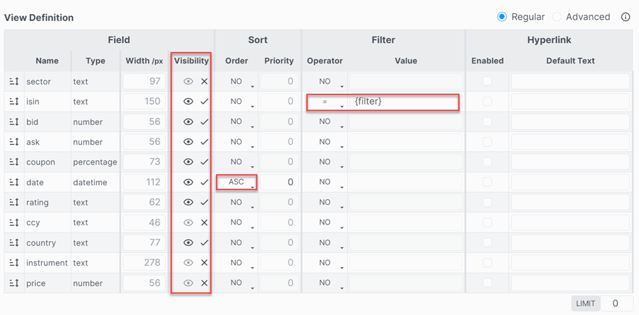
This user-friendly UI lets you determine what data a chatbot returns by setting specific properties, such as Visibility and Sort Order and also allows you to easily customise the data to your end user's preferred format. The View can also be configured to receive input parameters from the end user to apply more specific filters, such as finding an exact match on a particular value or string passed as a parameter.
For more complicated querie,s an advanced filter feature can be used, or automated watchlist filters can be applied with matches and compound columns, where the data is defined in the view based on the data itself!
Notifications Into Chat
Whereas a chatbot data request is usually triggered manually by an end user, a notification is instead an automatic update, sent to an end user, often driven by a change in the underlying data itself. In ipushpull, notifications can be configured by the end-user or by the data service provider. Here we will focus on the latter.
A notification requires 3 things. The trigger, the content to be sent and the destination. All can be configured by the data service provider via a user-friendly admin console.
While a trigger could be based on some evaluation of the data content itself, below we look at the simpler case where notifications trigger simply because the set data content has changed.
The screenshots below show two examples of destination configurations, one for email and the other for Microsoft Teams.
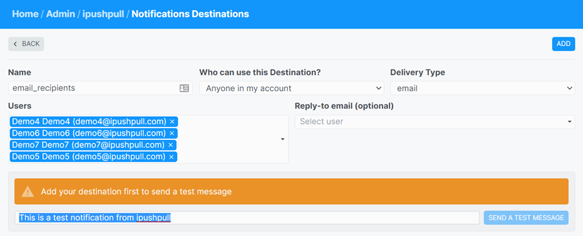
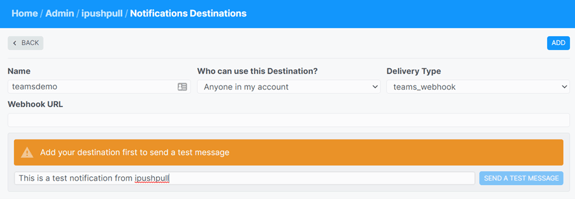
The content for a notification can be configured in a similar way as a chatbot request, by simply defining a View and associating it with the notifications.
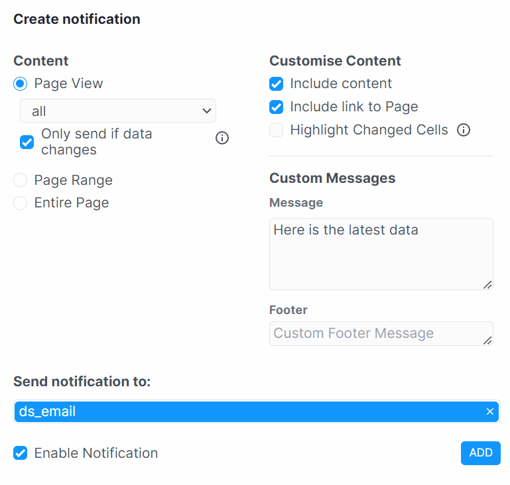
So in just a couple of easy steps, a notification has been configured to send an email to all recipients on ds_email with the data filtered to view all, to be sent whenever that data changes. If the data remains unchanged, no notification is sent.
Multi-platform
While it's necessary to tell ipushpull where to send a notification, it requires no destination-specific configuration. Similarly, for chatbots, there's no need to define what chat platform the end user is working in. ipushpull’s omnichannel delivery (supporting platforms such as Teams, Slack and Symphony and more) takes care of all differences so that no platform-specific config is needed.
Similarly, once end-users and data access permissions have been set up in the ipushpull platform, they're unified across all connected delivery channels, again meaning no platform-specific configuration.
Audit
ipushpull, of course, includes a full audit of all chatbot requests and notifications passing between the service and the end users across any delivery channel. The data service provider can present this information in ipushpull's analytics dashboards to analyse the usage of their end-users and clients, providing greater insight into behaviour and requirements, driving measurable service improvements and more flexible pricing possibilities.
Adaptability
In describing how notifications and chatbots are made available to users, the data structure has remained untouched. This highlights a key benefit of ipushpull’s omnichannel delivery, that is how quickly new data delivery channels can be added. This means client-specific demands can be met quickly without impacting existing delivery.
How does this help?
Data-driven services are looking to make data available over new channels of delivery. End-user requirements for different data formats, modes of update and delivery platforms are evolving fast. Using a platform like ipushpull to abstract away all the specifics of the individual platforms means the data service provider is able to rapidly respond to client demand without any re-engineering.
Choosing ipushpull's omnichannel delivery reduces the risk of investing in the wrong delivery channels, as well as making it easy to rapidly grow across platforms without additional technology investment.
To learn more about ipushpull's omnichannel chat solutions and other delivery channels like client APIs, Excel, and custom web apps visit here.
Learn more about Data as a Service from ipushpull.