


Quote Hub
Turn the axes, runs, RFQs, orders and trades in your chat into one live, permissioned view.


TRUSTED BY GLOBAL FINANCIAL INSTITUTIONS





Make your chat data usable
Today, interest builds in bilateral chat conversations and only completed trades get recorded. Quote Hub captures that chat data so desks on both sides of the trade can automate chat-driven work and get insight from their conversations.

Less manual effort
Prices and interest captured from chat, Excel and APIs, with no rekeying

More trade opportunities
Live consolidated views and alerts, so opportunities don't get missed

Easy trade reconstruction
Reconstruct the market when you traded, at the click of a mouse
From chat message to booked trade
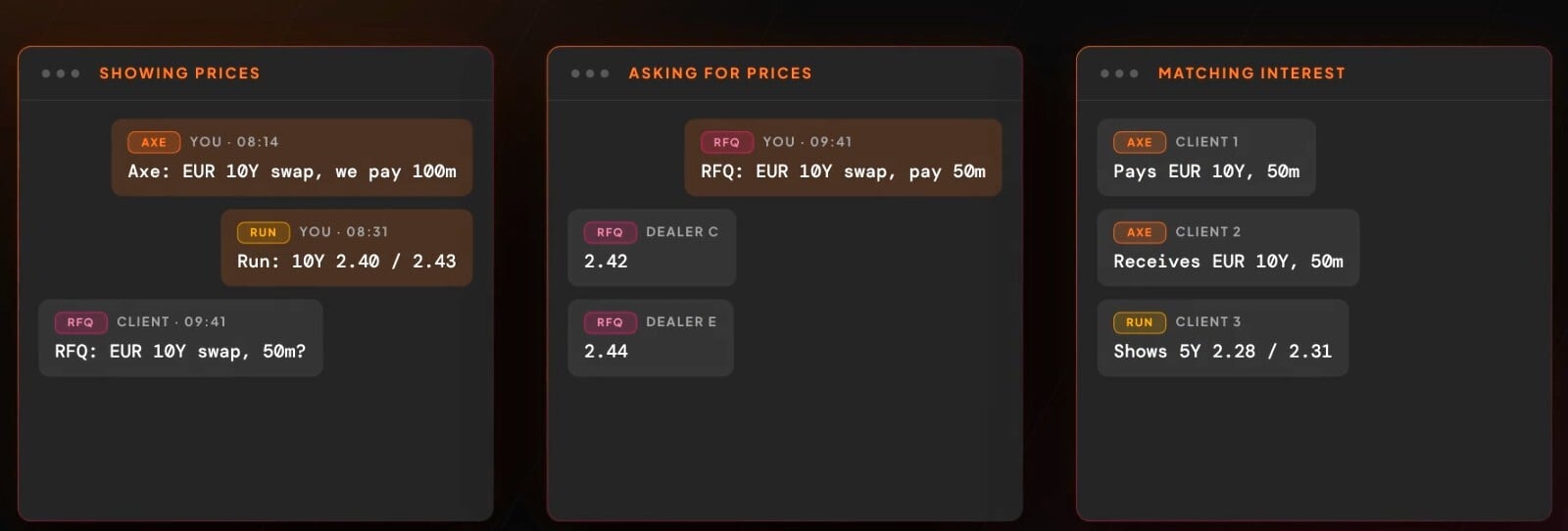
 How quotes are captured from chat and approved by a person
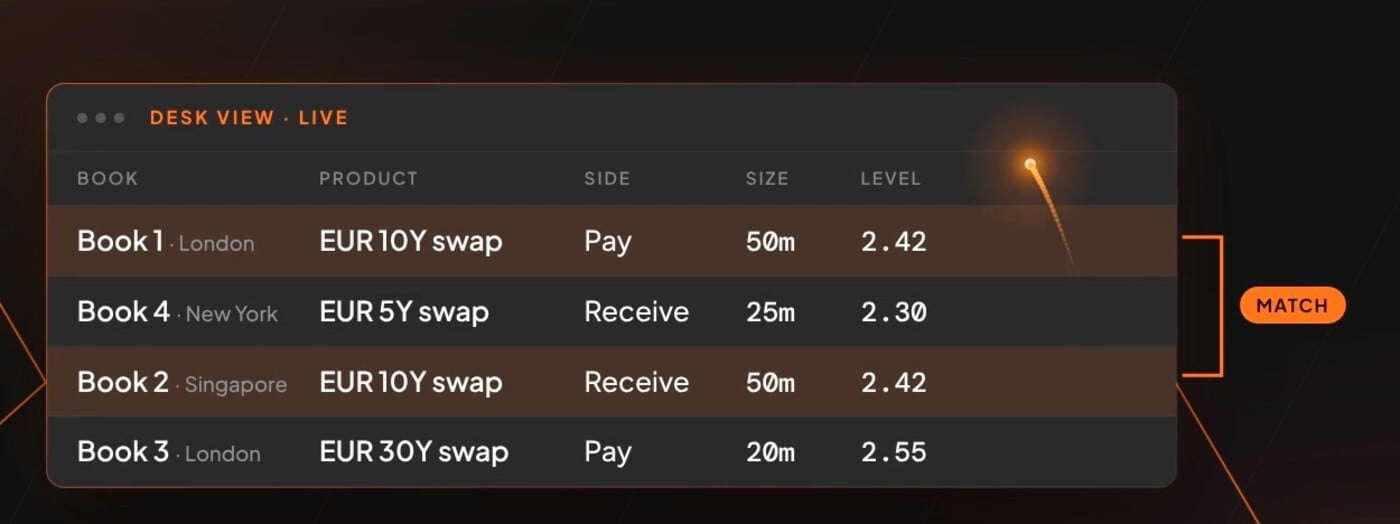
How desks in different offices work from the same live view
How responses go back into chat and on to downstream systems


Built for both sides of the trade
For the buy side
For the buy side
See what every dealer is showing you and how they perform.
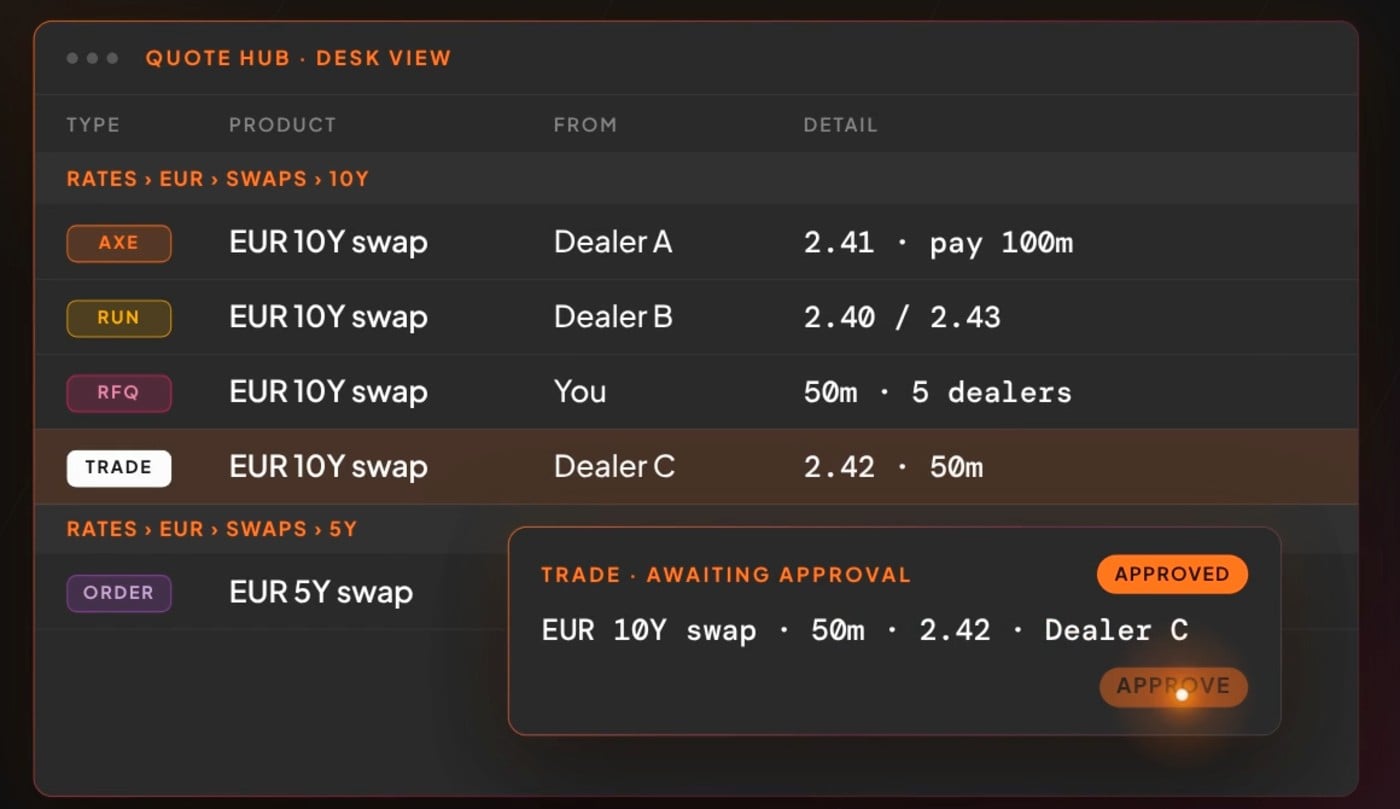
Every dealer's axes, runs and RFQ responses on one screen
Track dealer win rates, spreads and response times
See the market at the point of execution and reconstruct it after the trade

For brokers and dealers
For brokers and dealers
Respond to clients and bring counterparties together without leaving chat.
Build interest from market makers, clients and counterparties in one place
Manage RFQs and interest, then respond in chat with one click
Analysis of which axes actually trade is on the way
How Quote Hub works
Capture Interest
Capture Interest
Quote Hub captures axes, runs, RFQs, orders and trades from dealers, clients and counterparties in real time, from chat, Excel or APIs.
Messages are standardised and organised by your taxonomy, so you can build order books around specific products or see everything the market is showing you in one instrument.
Analyse Counterparties
Analyse Counterparties
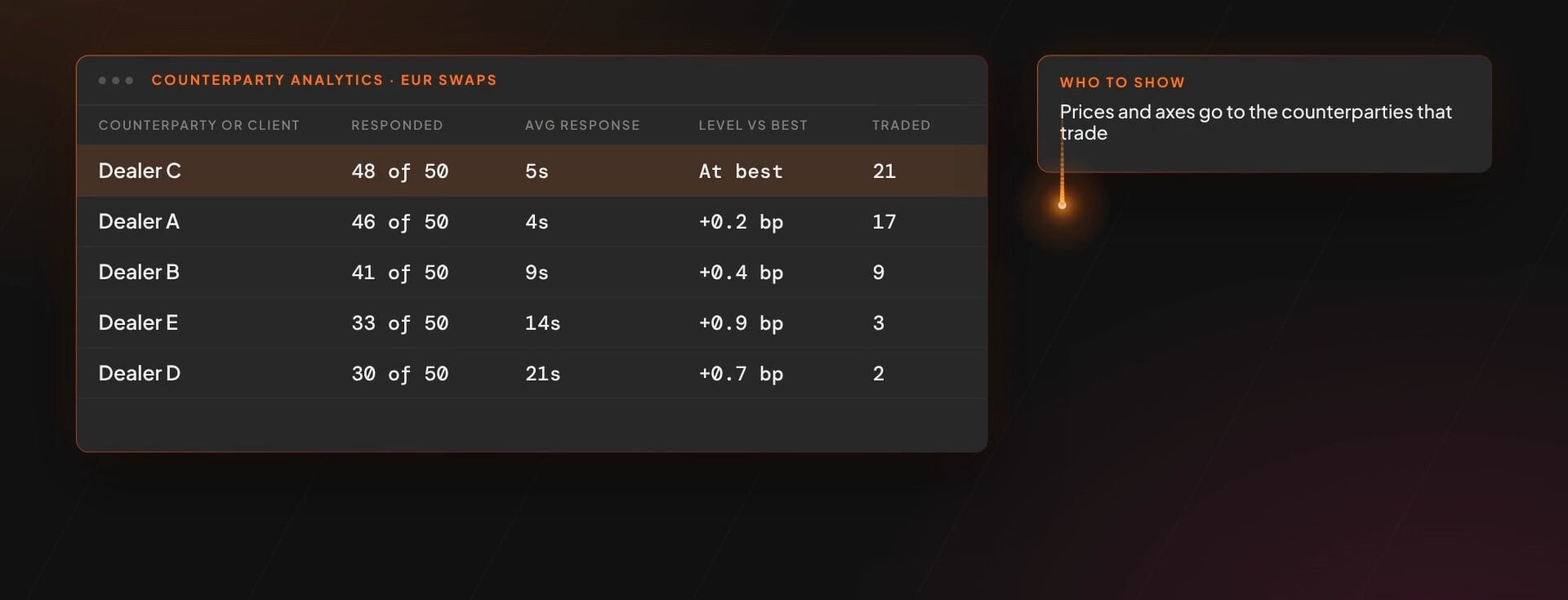
The analytics capability in Quote Hub tracks what counterparties and clients actually did: who responded, who traded and at what spread.
Buy-side desks can see the market and the potential counterparties at the point of execution, test an RFQ against history before it goes out, and reconstruct the picture after the trade.
Act & Book Trades
Act & Book Trades
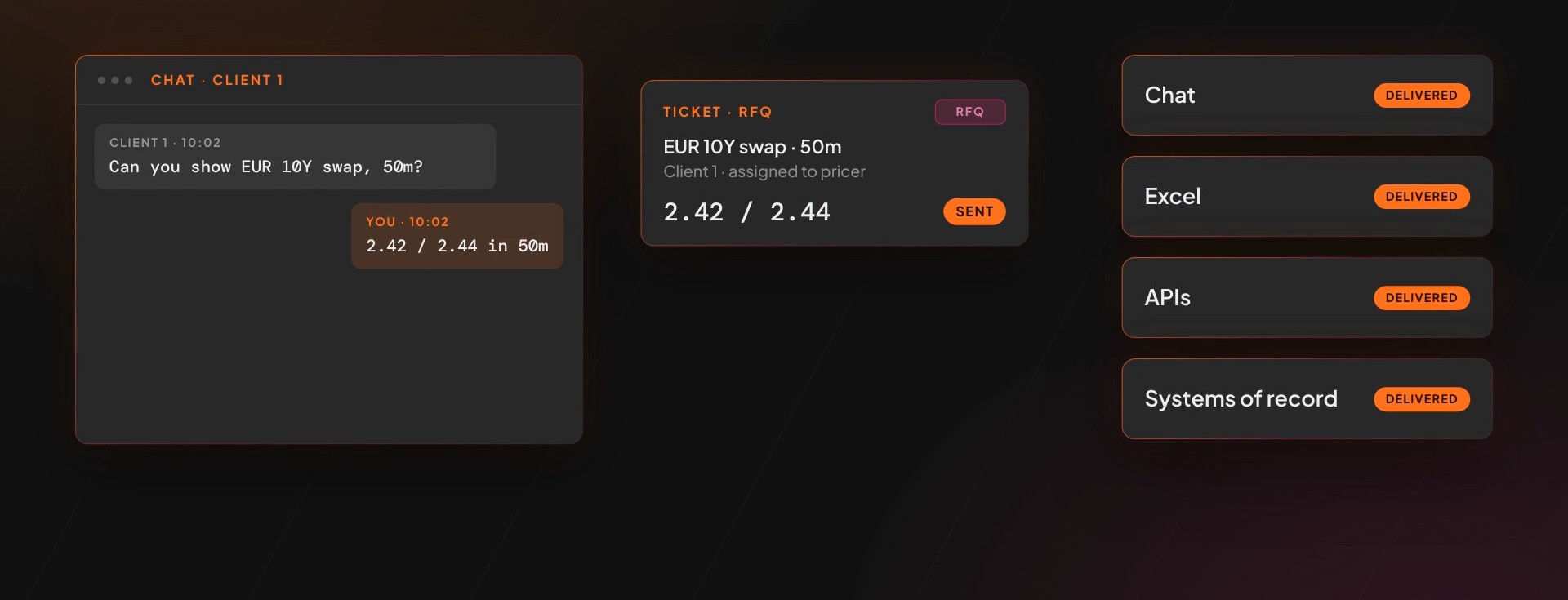
Once interest is established, Quote Hub lets you set alerts for opportunities to help bring counterparties together, and send responses back into chat with one click.
When a trade is agreed, booking is simpler, with automatic enrichment for other services and links to trading or order management platforms.
From there, Trade Capture and Booking turns agreed trades into validated records that can be booked into downstream systems.
Monitor & Manage
Monitor & Manage
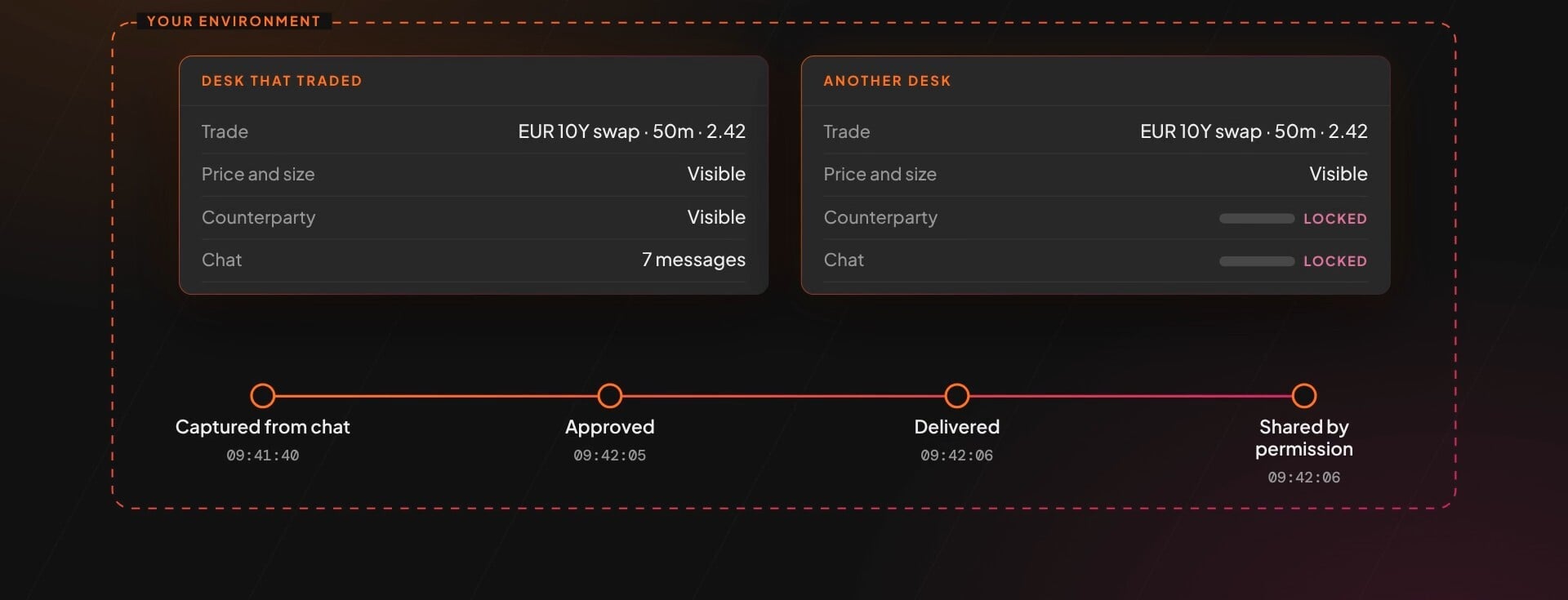
Dashboards let the desk monitor all messages and data in real time, integrated with the chat platform on the desk.
Errors are detected quickly and alerts sent to the desk for fast resolution, and every message and change sits under Control Hub permissioning with a full audit trail.
Get Inspired



Frequently asked questions
Which chat platforms does Quote Hub work with?

Quote Hub works with Bloomberg, Symphony, LSEG Messenger, WhatsApp, WeChat, Microsoft Teams, Slack and Telegram, and processes them all through the same workflow. It also takes in interest from email, Excel, APIs and web apps, so the desk gets one view across every channel. No client-side installation is needed.
Is Quote Hub for the buy side or the sell side?
Both. Buy-side desks use it to see the axes, runs and prices coming in from every dealer in one place, and to track how counterparties respond. Sales teams, dealers and brokers use it to respond to clients faster and bring together interest from market makers, clients and counterparties without leaving chat.
What does Quote Hub capture from chat?
Axes, runs, RFQs, orders and trades, including prices, quantities, instruments and counterparties. Each record is enriched with reference data such as ISINs, FX rates and calendars, and the original chat line is kept alongside it. Records can be sent on to downstream systems as FIX, JSON or Excel over REST or WebSocket.
Can Quote Hub use our historic chat?
Yes. Quote Hub can process historic chat and end-of-day transcripts as well as live messages, so desks can build a picture of the market from historic or on-the-day interest. Your chat archive becomes structured data you can query.
Who checks what Quote Hub captures?
Your traders do. Quote Hub produces a draft record and a person reviews and approves it before it is used. Every capture, approval and correction is logged with a full audit trail. Any corrections a trader makes feed back into the model, so it learns how your desk works.
How are access and changes controlled?
Through Control Hub. You set permissions and authorisation limits for users and desks, and every action is recorded with a full audit trail and data lineage. Human approvals and corrections are built into the workflow.
Is our data secure and kept private?
Yes. Your data remains yours. It is not shared across clients and is never used to train models for other clients. Permissions are set at field level and every inference is logged. ipushpull is ISO 27001 certified and data is encrypted in transit and at rest.
Quote Hub is delivered as SaaS, either dedicated to you or as a shared multi-tenant service. AWS is our primary hosting provider, with the option to host close to your business.
Can you help with a proof of concept?
Yes. Get in touch and our team will help you get up and running. If you do not have the resources available, tell us what you need and we can build a proof of concept for you.
What is your charging model?
ipushpull is a SaaS platform. We offer flexible pricing on quarterly or annual licences, with packages based on the type of hosting and the features and solutions you use.